

You can check your Israel ETA-IL application status online through the official Population and Immigration Authority (PIBA) portal at israel-entry.piba.gov.il using your application reference number and passport details. Most applications receive a response within 24 to 48 hours, though some take longer during peak travel seasons. This guide explains every method to track your ETA-IL status, what each status means, and what to do if your application is delayed or rejected.
What Is the ETA-IL and Why Status Tracking Matters
The ETA-IL (Electronic Travel Authorization for Israel) is a mandatory pre-travel authorization for visa-exempt nationals visiting Israel. Launched by the Population and Immigration Authority (PIBA), the system screens travelers before they arrive at Israeli borders.
Unlike a traditional visa, the ETA-IL does not require a visit to an embassy. You submit your application online, pay the fee, and wait for digital approval. Because the process is entirely electronic, checking your application status is also done online – there is no paper trail or in-person follow-up.
Tracking your ETA-IL status matters for several reasons:
- Flight bookings – Airlines may deny boarding without a confirmed ETA-IL
- Border entry – Israeli immigration officers verify your authorization at passport control
- Travel planning – Knowing your status early lets you adjust plans if issues arise
- Peace of mind – A quick status check confirms your authorization is active before departure
How to Check Your ETA-IL Application Status Online
The primary way to check your Israel ETA status is through the official PIBA website. Follow these steps:
Step-by-Step Status Check
- Visit the official portal – Go to israel-entry.piba.gov.il in your web browser
- Navigate to the status section – Look for a link or button labeled “Check Application Status” or “Track Application” on the homepage
- Enter your reference number – Input the application reference number you received by email when you submitted your ETA-IL application
- Provide passport details – Enter your passport number and nationality exactly as they appear on your travel document
- Complete verification – Fill in any CAPTCHA or security verification displayed on the page
- View your status – Click submit to see the current status of your application
If you applied through the official portal, your reference number was sent to the email address you provided during the application process. Check your inbox (and spam folder) for a message from PIBA or the Israel ETA system.
Checking via Email Confirmation
Your original application confirmation email contains your reference number and a direct link to check status. If you still have this email, click the link to go directly to your application status page without manually entering details.
Understanding Your ETA-IL Status: What Each Status Means
When you check your application, you will see one of several status indicators. Here is what each one means:
| Status | Meaning | What to Do |
|---|---|---|
| Pending | Application received, under review | Wait 24-48 hours, check again |
| Approved | Authorization granted | Save/print your confirmation for travel |
| Rejected | Application denied | Review the reason, consider reapplying |
| Additional Information Required | PIBA needs more details | Respond promptly with requested documents |
| Expired | Authorization validity ended | Reapply if you still plan to travel |
Pending Status
A “Pending” status means PIBA has received your application and it is in the review queue. This is the most common status immediately after submission. Standard processing takes 24 to 48 hours, but during busy periods (summer months, Jewish holidays, or major events), processing may take up to 72 hours or longer.
There is no need to reapply or contact PIBA while your status shows “Pending.” Repeated status checks will not speed up the process.
Approved Status
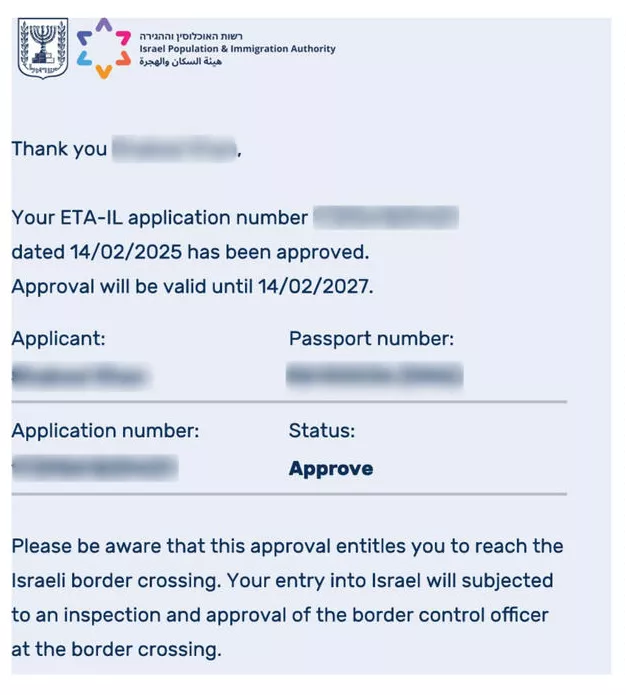
An “Approved” status means your ETA-IL has been granted. You will receive a confirmation email with your authorization details. Key information to verify:
- Your name matches your passport exactly
- Passport number is correct
- Authorization validity dates are accurate
- The number of entries permitted (single or multiple)
Save a digital copy of your approval on your phone and print a backup copy. While Israeli border officers can verify your ETA-IL electronically, having a printed copy provides an extra layer of assurance.
Rejected Status
A “Rejected” status means your application was denied. Common reasons for rejection include:
- Incorrect passport information entered during application
- Passport expiring within six months of your planned travel
- Previous immigration violations or overstays in Israel
- Incomplete or inconsistent application data
- Security-related concerns flagged during screening
If your application is rejected, you may reapply with corrected information. There is no formal appeal process for ETA-IL rejections, but submitting a new application with accurate details often resolves the issue.
How Long Does the ETA-IL Status Check Take to Update
The ETA-IL system updates in near real-time. Once a decision is made on your application, the status reflects immediately when you check online. However, the time from submission to decision varies:
| Scenario | Typical Processing Time |
|---|---|
| Standard application | 24 to 48 hours |
| Peak travel season | 48 to 72 hours |
| Additional information requested | Varies (depends on your response time) |
| Reapplication after rejection | 24 to 48 hours |
If your status remains “Pending” for more than 72 hours, consider contacting PIBA directly through their official channels listed on the website.
What to Do If You Cannot Check Your Status Online
In some cases, you may have trouble accessing the status check portal. Here are solutions for common issues:
Lost Reference Number
If you lost your application reference number:
- Search your email inbox for messages from PIBA or the Israel ETA system
- Check the spam or junk folder for emails from official Israeli government domains
- Contact PIBA through the support form on israel-entry.piba.gov.il with your full name, passport number, nationality, and approximate application date
Website Not Loading
The PIBA portal may experience downtime during maintenance windows. If the site is not loading:
- Try again in 30 minutes to 1 hour
- Clear your browser cache and cookies
- Use a different browser or device
- Disable any VPN that might be routing through a blocked region
Technical Errors During Status Check
If you receive an error message when checking status:
- Verify that your reference number is entered correctly (no spaces or extra characters)
- Ensure your passport number matches exactly what you entered on the application
- Try using uppercase letters for the reference number if applicable
- Contact PIBA support if the error persists after multiple attempts
Tips for a Smooth ETA-IL Application and Status Check
To avoid delays and ensure a straightforward status tracking experience, follow these best practices:
- Apply early – Submit your ETA-IL at least two weeks before your planned travel date
- Double-check information – Review the ETA-IL requirements and verify all passport details before submitting your application
- Save your confirmation – Store your reference number in a secure, accessible location
- Use a valid email – Ensure the email address you provide is active and monitored
- Check spam folders – PIBA emails may be filtered as spam by some email providers
- Monitor your status – Check once every 24 hours rather than repeatedly in short intervals
- Keep your passport current – Your passport must be valid for at least six months beyond your planned entry date
Frequently Asked Questions About ETA-IL Status
How do I check my Israel ETA status?
Visit israel-entry.piba.gov.il and enter your application reference number along with your passport details. The portal displays your current status immediately after submission.
How long does it take to get an ETA-IL approved?
Most ETA-IL applications are approved within 24 to 48 hours. During peak travel periods, processing may take up to 72 hours. If additional information is required, the timeline depends on how quickly you respond.
Can I check my ETA-IL status without a reference number?
You need your reference number to check status online. If you lost it, search your email for the original confirmation from PIBA or contact their support team with your passport details and application date.
What does it mean if my ETA-IL status says Pending?
Pending means your application has been received and is being reviewed. This is normal and typically resolves within 24 to 48 hours. Do not reapply while your status is Pending.
Can I travel to Israel while my ETA-IL is still pending?
No. You must have an approved ETA-IL before boarding your flight to Israel. Airlines will verify your authorization status at check-in, and Israeli border control requires a valid ETA-IL for entry.
My ETA-IL was rejected. Can I apply again?
Yes. You can submit a new ETA-IL application after a rejection. Review the rejection reason carefully, correct any errors in your application, and resubmit. There is no waiting period between applications.
How will I know when my ETA-IL is approved?
You will receive a confirmation email at the address you provided during application. You can also check your status at any time on the PIBA portal using your reference number.
Is the ETA-IL status check available in languages other than English?
The PIBA portal is available in multiple languages including English, Hebrew, Arabic, Russian, and French. You can switch languages using the language selector on the website.
What is the difference between ETA-IL status and visa status?
The ETA-IL is an electronic travel authorization for visa-exempt nationals, while a visa is a separate document required for non-exempt nationals. Status tracking for each is handled through different systems on the PIBA website.
Can someone else check my ETA-IL status for me?
Yes. Anyone with your reference number, passport number, and nationality can check your status on the portal. However, only the applicant should make changes or respond to requests for additional information.